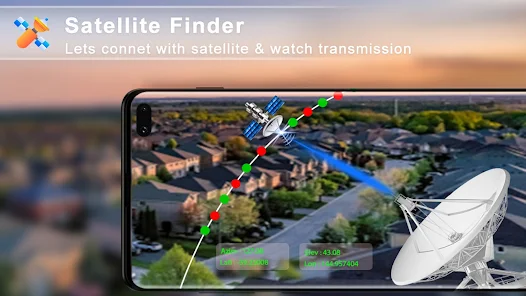
Satellite Finder Pro is a powerful Android application designed to help users align satellite dishes quickly and accurately. Whether you are setting up a new dish antenna or adjusting an existing one for a stronger signal, this app provides advanced tools that make the process much easier. With GPS support, augmented reality features, and real-time satellite tracking, the app transforms your smartphone into a professional satellite alignment assistant.
One of the app’s biggest strengths is its simple and user-friendly interface. Many satellite alignment tools can feel overly technical, but Satellite Finder Pro focuses on making the process understandable for both beginners and experienced installers. Users only need to enable GPS, select a satellite, and follow the on-screen guidance to begin alignment.
Some of the main features include:
Real-time satellite tracking
GPS-based dish positioning
Built-in compass and azimuth calculation
Augmented reality satellite visualization
Live Earth map integration
The augmented reality functionality is one of the most impressive aspects of the application. By using the phone’s camera, the app overlays satellite positions directly onto the screen, helping users visualize where to point their dish. This feature significantly reduces guesswork and makes installation more efficient, especially for users unfamiliar with satellite positioning.
Another useful capability is the app’s accurate compass and angle calculations. Satellite Finder Pro calculates azimuth, elevation, and inclination angles based on the user’s GPS location. This ensures precise dish alignment and helps improve signal strength and connection stability. For households depending on satellite television or satellite internet, this accuracy can make a huge difference.
The app also includes several visualization and mapping tools that improve the installation experience. Users can switch between different map views such as terrain, hybrid, and satellite mode to better understand their environment and avoid obstacles that may block signals. These extra tools help users choose the best installation location before mounting the dish.
Additional helpful features include:
Terrain and hybrid map modes
Real-time signal detection
Satellite direction guidance
Compass calibration tools
Signal optimization assistance
Many users appreciate the convenience and flexibility that Satellite Finder Pro provides. Instead of relying on expensive professional equipment, users can perform most alignment tasks directly from their smartphone. This makes the app especially useful for home users, technicians, travelers, and installers working in remote areas.
Community discussions around satellite tracking apps also highlight the growing popularity of augmented reality and GPS-based alignment tools. Users often mention that these apps simplify dish installation and eliminate much of the trial-and-error process traditionally involved in satellite alignment.
While the app offers many advanced features, some users have mentioned occasional issues such as excessive advertisements or sensor-related inaccuracies depending on the phone model. Since the app depends heavily on device sensors like the compass and gyroscope, performance can vary across smartphones. However, for many users, the convenience and functionality still outweigh these minor drawbacks.
Some common advantages users mention include:
Easy setup process
Helpful AR visualization tools
Accurate GPS positioning
Faster dish alignment
Beginner-friendly controls