If you have ever stood under a dim light, trying to read a 16-digit scratch card code while your phone’s USSD menu times out, you know the frustration. Manual entry is slow, error-prone, and genuinely annoying—especially if you are recharging multiple phones for family members or a small business. That is exactly where BBScan steps in. This simple utility app turns your phone’s camera into a fast recharge code reader. But it can do much more than just mobile top-ups. Let’s break down how it works, what it scans, and whether you should download it today.
What Exactly Does BBScan Do?
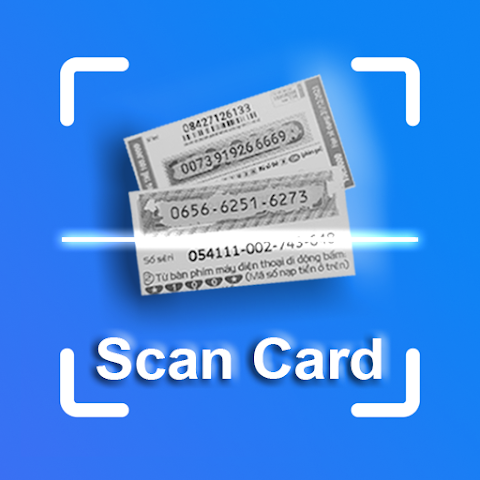
At its heart, BBScan is a barcode and code-reading tool designed specifically for prepaid cards. Instead of typing a long scratch card number manually, you just point your camera at the card’s printed code. The app recognizes the digits almost instantly. You can then copy that code, paste it into your dialer or operator’s app, or use it as needed.
The official description highlights these core abilities:
- Scan recharge card codes for any mobile operator worldwide (Ethio telecom, Safaricom, and others).
- Scan discount or gift cards that have printed codes.
- Scan any other card that has a visible numeric or alphanumeric code.
- Scan from your gallery – If you took a photo of a card earlier, the app can read the code from that saved image.
This last feature is surprisingly useful. Imagine someone sends you a picture of a recharge card. Instead of zooming in and trying to type the numbers while switching between apps, BBScan reads it directly from the photo.
How It Saves You Time and Headaches
Manual typing of recharge codes is not just slow; it is a major source of errors. One wrong digit, and you either get an "invalid code" message or—worse—you recharge the wrong number. For shop owners, call-center agents, or anyone who handles multiple recharges daily, those seconds add up. BBScan reduces each recharge to a simple point-and-scan action.
Consider these real-life scenarios where the app shines:
- Recharging your own phone without needing glasses or perfect lighting.
- Helping a less tech-savvy family member – You can scan their card for them.
- Business use – A small kiosk that sells scratch cards can scan the code to verify or log it before handing the card to a customer.
- Bulk recharging – Save a list of scanned codes and apply them one by one without retyping.
The app does not actually perform the recharge for you. It only reads the code. But by removing the typing bottleneck, it makes the whole process much faster and less frustrating.
The Handy "Save and Export" Feature
One feature that sets BBScan apart from a generic barcode scanner is its ability to save a list of scanned card codes and export them to an Excel file. Why would you want that? Imagine you run a small business that receives dozens of scratch cards as payments or inventory. Instead of keeping a pile of plastic cards, you can scan each one, save the codes in a digital list, and export them to a spreadsheet for accounting or later use.
Similarly, if you are a parent who buys multiple cards for different children’s phones, you can scan and save all codes on Sunday evening, then apply them throughout the week without carrying the physical cards. This turns BBScan from a simple scanner into a lightweight inventory tool.
Data Privacy and Security: What You Should Know
Whenever an app asks for camera or gallery access, it is smart to check its data handling. According to the Google Play listing, BBScan does not collect any personal data about you. That is excellent news. However, the app may share photos, videos, files, documents, and three other unspecified data types with third parties. The listing also states that data is encrypted in transit, which is good.
The biggest drawback in the privacy section is this: Data cannot be deleted. That means once you scan a card or save a list, there is no way to remotely wipe that information from the app’s storage (though you can delete the app itself). If you scan highly sensitive codes, keep this in mind. For most people scanning ordinary recharge cards, the risk is minimal, but it is worth noting.
Recent Updates: Excel Export and Bug Fixes
The app was last updated on October 23, 2025, which is fairly recent at the time of this writing. The two key changes in that update are:
- Export to Excel file – As described above, this allows you to save scanned codes in a structured spreadsheet.
- Bug fixes and performance improvements – Always a good sign that the developer is actively maintaining the app.
No news about Android 15 compatibility yet, but given the update date, it likely works well on Android 13 and 14. If you have the very latest Android version, check user reviews first.
Who Is BBScan For? (And Who Can Skip It)
This app is not for everyone, but for a specific group, it is a genuine time-saver. You will benefit most if:
- You regularly buy physical or digital scratch cards for Ethio telecom, Safaricom, or any operator.
- You manage recharges for multiple family members or employees.
- You run a small shop or kiosk that sells prepaid cards.
- You have trouble reading small print or find manual typing annoying.
- You want to keep a digital record of card codes for accounting.
You can probably skip BBScan if:
- You only recharge via bank app, USSD, or operator app (never use scratch cards).
- You are uncomfortable granting camera permissions to third-party apps.
- You use a single phone and recharge once a month – typing 16 digits is not a big burden.
For frequent scratch-card users, however, the time savings add up quickly.
Final Verdict: A Niche but Useful Tool for Prepaid Users
BBScan does one thing, and it does it decently: it reads codes off cards so you do not have to type them. It is not a flashy app, nor does it pretend to be. The ability to scan from gallery photos and export lists to Excel adds real value beyond a simple barcode reader. The privacy policy has a yellow flag (data cannot be deleted), but the fact that no personal data is collected balances that for most casual users.
If you are tired of squinting at scratch cards and making typos, give BBScan a try. It will not revolutionize your life, but it will save you a few seconds and a bit of eye strain every time you recharge. And for anyone who handles dozens of cards a week, those seconds become minutes, and those minutes become real convenience.
Bottom line: Download it, test it on one scratch card, and see if the scan speed impresses you. For the price of free, it is a low-risk experiment that might just become a tool you rely on.