Let’s face it: needing a last‑minute passport or visa photo is a universal source of stress. You either rush to a pharmacy or photo studio, pay anywhere from 7to
7to15 for a set of tiny prints, and hope the lighting and background meet the official requirements. But what if you could skip the trip, avoid the cost, and still get a fully compliant photo? That’s exactly what Passport Photo Maker – Visa/Passport Photo Editor by Code Yatra LLC (available on Google Play) promises to deliver. With over 10 million downloads and a stellar 4.8‑star rating, this app has clearly struck a chord with travelers, students, and professionals alike.
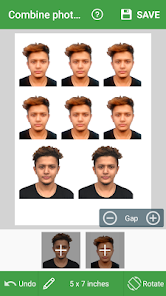
The core idea behind this app is brilliant in its simplicity: it turns your smartphone into a passport photo studio. You take a picture using the app, select your country and document type (passport, visa, ID, or license), and the tool automatically crops the image to the exact official dimensions. But it doesn’t stop there. The app then arranges that single photo onto standard print sheets like 3x4, 4x4, 4x6, 5x7, or A4 paper. You can print the sheet at home, at a local photo kiosk, or through an online printing service. One sheet gives you multiple identical passport photos—enough for several applications or renewals.
What makes this app a genuine money‑saver is that most essential features are completely free. Users report saving hundreds of dollars over time by avoiding studio fees. Of course, there are optional in‑app purchases for advanced tools like one‑tap background removal and an “ink‑saving” mode for printing. But the basic workflow—capture, crop, arrange, and export—remains accessible to everyone. If a purchase doesn’t work on your device, the developer offers refunds, which adds a layer of trust.
Let’s break down the main features that users love most:
- Worldwide compliance: The app includes official photo specifications for virtually every country. You don’t need to memorize size ratios or head‑position rules; the software handles it.
- Multiple print layouts: Choose from 3x4, 4x4, 4x6, 5x7, or A4 paper. Each layout maximizes the number of usable photos per sheet.
- Background removal (premium): Quickly replace a messy room background with a plain white or light gray one, meeting government standards.
- Print cost estimation: A built‑in tool estimates how much you’ll pay at different print service providers.
- Camera guides and sample photos: The app shows example poses and lighting, helping you take a usable shot on the first try.
Beyond the headline features, the developer has been actively improving the app. Recent updates include full support up to Android 13, a simplified user interface, and a faster background‑removal tool with reported bug fixes. Users also praise the stable camera module and the absence of artifacts or pixelation in exported high‑quality photos. For anyone frustrated by blurry or distorted output from other editing apps, this is a big relief.
Now, I do need to mention a couple of caveats so you can make an informed decision. First, the app displays advertisements. You can watch ads to save your final photo to your device for free, which is a fair trade‑off given the otherwise free functionality. Second, a few users note that automatic background removal is a premium (paid) feature. If you want truly one‑tap background changes, you may need to spend a small amount. However, you can always manually erase the background using basic tools—it just takes a bit more effort. Finally, the app’s data safety section says it shares photos/videos and device IDs with third parties, but data is encrypted in transit, and you can request deletion.
So, does Passport Photo Maker actually work for official documents? According to thousands of user reviews, yes. One reviewer named Fan ZHOU mentioned using the app to prepare for a visa‑on‑arrival situation while traveling. Another user, tina qin, gave it high marks for saving edited photos after watching ads, even if she wished for a one‑click background change. Perhaps most convincingly, a reviewer named Fei compared it to a $5.99 web service and concluded: “This app does it just as well, only requiring a few ads, and doesn’t cost that much money.”
Bottom line: If you need a passport, visa, or ID photo and want to avoid the expense and hassle of a studio visit, Passport Photo Maker – Visa/Passport Photo Editor is an excellent tool. It’s free to start, supports almost every country’s specifications, and gives you high‑quality printable sheets. Just watch a few ads or consider a small in‑app purchase for advanced background removal. Keep the disclaimer in mind—the app is provided “as is,” and you are responsible for ensuring the final photo meets official requirements—but in practice, thousands of travelers have used it successfully. Download it before your next trip, and save both time and money.