For months, the tech world buzzed with a single question: when would ChatGPT have a proper, official mobile app? Third-party wrappers came and went, but nothing matched the real thing. Now that the official ChatGPT app is live on the Google Play Store, with over 40 million ratings and a stellar 4.8 average, it’s time to give it a proper hands-on look. This isn’t just a web view squeezed onto a small screen. It’s a full-featured AI companion designed to fit into your daily rhythm—from voice-powered bedtime stories to last-minute business plans.
Let’s walk through what makes this app tick, where it stumbles, and why tens of millions of people are already using it to work, learn, and create differently.
More Than a Chatbot: Your New Creative and Practical Sidekick
At its core, the ChatGPT app gives you access to OpenAI’s latest and smartest models, including GPT-4o, for free. But what really matters is how you use it. The app transforms your phone into a tool that can see, listen, and respond in surprisingly human ways. Forget typing long queries. You can just tap the headphone icon and speak naturally. Need a spontaneous bedtime story for a dinosaur-obsessed kid? Ask out loud. Debating a fact at dinner? Let ChatGPT settle it instantly.
The feature list is thoughtfully curated for mobile life:
- Voice Mode: Walk, drive, or cook hands-free. It reads back answers aloud, making multitasking real.
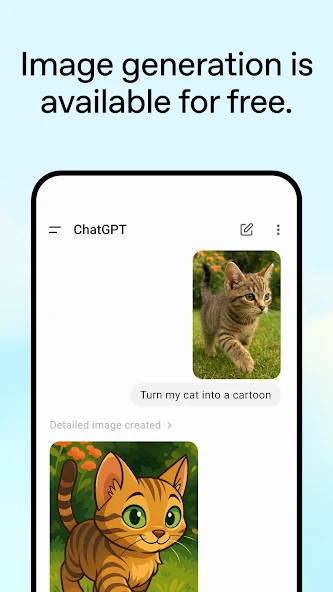
- Photo Uploads: Snap a picture of a handwritten recipe, a historical monument, or a confusing diagram. ChatGPT can transcribe, explain, or translate what it sees.
- Personalized Learning: Ask it to explain electricity “to a child who loves dinosaurs,” and it adapts instantly. Review a forgotten historical event in plain English.
- Professional Edge: Draft marketing copy, outline a business plan, or polish an email draft—all from your phone.
This isn’t a gimmick. For students, busy parents, and freelancers, having instant, voice-enabled access to an AI that remembers context is genuinely useful.
What Real Users Are Saying (The Good and the Glitchy)
With over 42 million reviews, the app has passionate fans and frustrated critics. The overall 4.8 rating is impressive, but the Play Store comments reveal a more nuanced picture. Positive reviews praise the app’s speed, the quality of GPT-4o’s answers, and the seamless sync with the web version. Many note how voice mode has become their go-to for brainstorming while driving or exercising.
However, some recurring issues deserve attention. One user (AppaEscort ISS) points out a common pain point: formula formatting. On mobile, complex equations often appear as garbled code or get cut off. You frequently need to switch to a desktop browser to see the full, clean output. Another user (YT Lin) describes a frustrating first experience where the app caused constant vibrations, and the AI itself incorrectly suggested changing phone settings—only for the user to later find the vibration toggle inside the ChatGPT app’s own settings. Ouch.
Other gripes include slow image loading (the app seems to re-download images instead of caching them locally) and laggy chat history scrolling. One reviewer (李田所) even complains about the AI “making things up,” triggering web search unreliably, and a UI bug where the sidebar goes full-screen with no visible avatar. These are classic growing pains of a complex app, but they remind us that even the smartest AI can have dumb interface moments.
Data Security and Privacy: What You Should Know Before Typing
Before you dive into sharing personal stories or uploading sensitive documents, let’s talk privacy. According to the official Play Store listing, the ChatGPT app does encrypt data in transit, which means your conversations are protected while moving between your phone and OpenAI’s servers. You can also request that your data be deleted. That’s good.
However, the app does collect certain information: location, personal info (like your name/email if you log in), and device ID. It may also share your device ID or other IDs with third parties. This is fairly standard for AI apps that improve models based on usage, but it’s worth being aware of. If you’re in a regulated industry or deeply privacy-conscious, you might want to avoid uploading confidential documents. For everyday questions, creative writing, or meal planning, the risk is minimal for most users.
Who This App Is Perfect For (And Who Should Wait)
Let’s get practical. This app shines for three types of people:
- The On-the-Go Professional – You need to draft emails, rephrase tricky messages, or brainstorm pitches while commuting. Voice input saves time.
- The Curious Learner – You love asking “why” about everything. Having an AI that adjusts its explanation style (from “simple” to “expert”) is like having a patient tutor.
- The Creative Hobbyist – You write stories, make cards, or need gift ideas. The photo feature is surprisingly great for scanning old family recipes or capturing inspiring signs.
Who might want to stick with the web version for now? Heavy math and science users who rely on complex formulas. The mobile formatting issues are real. Also, anyone with an older phone might experience the lag and slow image loading mentioned in reviews. Try the app, but keep the web tab open as a backup.
Final Verdict: A Must-Try Free Tool With Room to Grow
The official ChatGPT Android app is not flawless, but it is remarkably capable. The core experience—having a smart, voice-responsive AI in your pocket—is genuinely futuristic. For the vast majority of everyday tasks: writing, learning, brainstorming, summarizing, and answering random questions, it works beautifully. The bugs are annoying but not deal-breaking for most casual users. And remember, the base version is free.
If you haven’t tried it yet, download it from the Google Play Store (just search “ChatGPT” by OpenAI). Give voice mode a spin. Upload a photo of a menu in another language. Ask it to explain quantum physics like a pirate. You might find, as millions already have, that your phone just got a whole lot smarter. Just be patient with the formula display and maybe turn off vibrations in the settings before you start.