Your home screen is the digital front door to your phone. For many of us, it is a grid of icons that looks largely the same as it did five years ago. But what if your launcher could be as unique as your DNA? That is the ambitious promise of DNA Launcher. Developed by an independent creator, this app offers not one, not two, but three distinct home screen styles—including a fascinating holographic 3D mode. With a 4.2-star rating from over 18,000 reviews and active development (a major v3 update is coming), DNA Launcher is quietly building a loyal following. Let us explore what makes it different from the sea of generic launchers.
Three Launchers in One: A Style for Every Mood
Most launchers give you one layout with a few customization options. DNA Launcher takes a completely different approach: it offers three distinct operating modes that you can switch between anytime. Think of it as having three different phones in one.
Here is how each style works:
- Classic Style – A traditional horizontal scrolling layout with pages. Familiar to anyone who has used Android for years, but with extra customization.
- Minimalist Style – Designed for one-handed use. It uses a language-based alphabetical index to find apps quickly, reducing clutter.
- Hologram Mode – This is the showstopper. A watch-like, touchable holographic 3D rotation that makes your apps float in a futuristic carousel. It is genuinely unique among launchers.
Being able to switch between these styles means you can use Hologram Mode to impress your friends, then switch to Minimalist when you need to get work done quickly. No other launcher offers this kind of stylistic flexibility out of the box.
Privacy First: App Locking and Hidden Pages
One of the most practical features of DNA Launcher is its built-in privacy tools. You do not need a separate app locker. Directly within the launcher, you can:
- Hide apps from the app drawer entirely.
- Lock apps with a password or pattern.
- Lock folders – and even folders inside folders.
- Hide entire home screen pages – the developer gives the amusing example of hiding a Tinder page if you are no longer single, adding: "but honesty is the best policy."
The hidden pages feature is particularly clever. By long-pressing the scroll bar, you can temporarily hide a page without deleting its contents. This is perfect for keeping a work page visible only during office hours, or hiding a shopping page until payday. When you need the page back, just long-press again.
Smart Search and App Organization
DNA Launcher does not just look different; it also changes how you find and launch apps. It provides two complementary systems:
- App Drawer – A traditional alphabetical list that can display icons only or icons with labels, in vertical or horizontal scrolling.
- App Library – This automatically organizes your apps into categories (like Social, Games, Productivity) and even sorts them by how frequently you use them. No more scrolling through a long list of rarely-used apps.
On top of that, the Smart Search feature lets you find apps or contacts instantly, with voice assistant support and suggestions. You can also define your own internet search engine from a list that includes Google, DuckDuckGo, Bing, and Baidu. This integration means you can search the web directly from your home screen without opening a browser first.
Customization: Icons, Fonts, Gestures, and Effects
For users who love to tweak every pixel, DNA Launcher delivers. You can customize:
- Icon packs – Use any third-party Android icon pack.
- Icon shapes and sizes – Make them round, squircle, or custom.
- Fonts – Change the system font used on the home screen.
- Wallpapers – Built-in or your own.
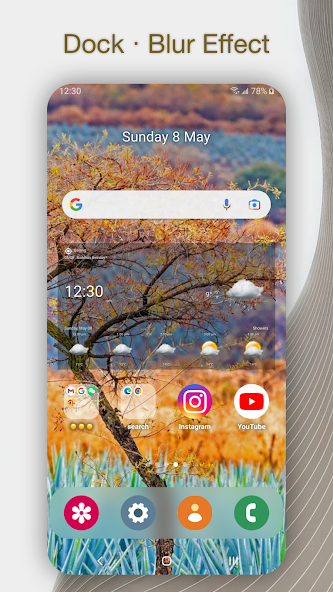
- Dock effect – A live real-time blur (the developer notes it is optimized to avoid performance hits).
- Folder animations – Stylish opening and closing effects.
- App launch animations – Choose how apps animate when you open them.
- Day/night mode – Automatic theme switching.
The launcher also supports custom gestures for power users. You can assign actions to double-tap, swipe up/down, or swipe left/right. These gestures can open the app drawer, the app library, or any other function you choose. You can even double-tap to lock your screen—no need to press the power button.
Accessibility Permission: Why It Is Needed and Why It Is Safe
One common concern with launchers is the Accessibility Service permission. DNA Launcher is upfront about why it needs this: solely to support locking the screen via custom gestures (like double-tap to lock). The developer explicitly states:
- The service is optional and disabled by default.
- It does not collect any personal or sensitive data.
- It is only used for the screen-lock gesture feature.
This transparency is refreshing. Many launchers request accessibility permissions without explanation, which is a red flag. DNA Launcher tells you exactly why, and lets you opt out. If you never use gesture-based screen locking, you can simply not grant the permission, and the rest of the launcher will work fine.
Current State and Upcoming v3 Update
DNA Launcher is not perfect. User reviews from 2023 and 2024 point to some bugs: icons occasionally becoming undraggable, editing mode getting stuck, and the app library category system being limited (only one custom category). The developer, Atlantis Ultra Station (based in China), has been responsive to these complaints. In the "What's New" section, they announce a major v3.0 update that promises to "completely solve these problems" and "dramatically improve the experience."
They also warn users: "Please avoid joining the testing program casually unless you are ready to explore unfinished features. Unlike v2, v3 is not a continuation, but a fresh new beginning." This suggests v3 will be a complete rewrite. If you have been frustrated by bugs in the past, v3 (when released) may be the time to revisit. For new users, the current version is stable enough for daily use, according to the 4.2-star rating.
Who Should Download DNA Launcher?
DNA Launcher is not for the average user who is happy with their stock launcher. It is for explorers, tinkerers, and privacy-conscious individuals. You will love DNA Launcher if:
- You are bored with the look of your phone and want something truly different (especially Hologram Mode).
- You want built-in app locking and page hiding without installing separate apps.
- You appreciate automatic app categorization and smart search.
- You enjoy customizing gestures, animations, and icon packs.
- You want to support an independent developer who is actively rebuilding the app (v3 coming).
You might skip DNA Launcher if:
- You prefer a simple, no-fuss launcher like the Pixel Launcher or Niagara.
- You are running an older phone and are worried about performance (the holographic mode may be demanding).
- You cannot tolerate occasional bugs (though v3 aims to fix them).
- You do not want to grant any permissions (though you can skip accessibility).
For most users, the free version offers plenty of features. There is no aggressive ad model mentioned, which is a plus.
Final Verdict: Ambitious, Unique, and Improving
DNA Launcher stands out in a crowded field by offering genuine innovation—three distinct styles, built-in privacy features, and a developer who listens to feedback. The Hologram Mode alone is worth installing just to experience. Yes, the current version has some rough edges (stuck editing mode, occasional drag issues), but the promised v3 rewrite shows that the developer is committed to polishing the experience.
If you are tired of launchers that all look the same, give DNA Launcher a try. Explore the three styles, lock a few private apps, hide a page or two, and double-tap to lock your screen. You may find that your home screen can be more than just a grid—it can be a reflection of your digital personality. Just remember to back up your layout before updating to v3 when it arrives.
Bottom line: A feature-packed, privacy-respecting launcher for Android users who want something different. Watch for the v3 update—it could turn a good launcher into a great one.