Your phone's lock screen is the first thing you see every time you pick up your device. For most people, it is a simple clock and a static background. But what if every time you touched the fingerprint sensor, a burst of neon light rippled across the screen? What if your lock screen felt alive, with holographic animations and smooth 3D effects responding to your touch? That is exactly what Fingerprint Live Animation promises. With a strong 4.4-star rating from over 87,000 reviews and more than 5 million downloads, this app has clearly caught the attention of users who want to personalize their Android experience. But is it all style with no substance? Let us take a closer look.
What Exactly Does This App Do?
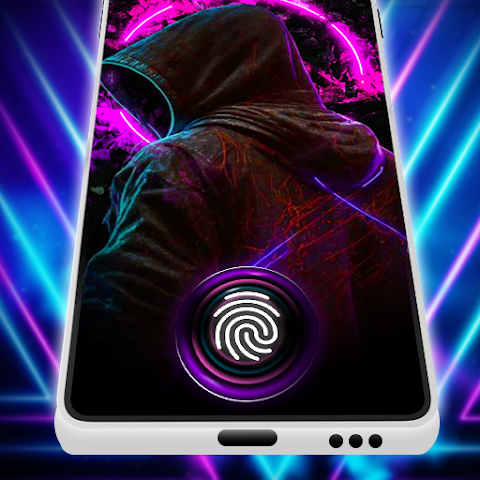
At its core, Fingerprint Live Animation is a customization tool for your lock screen. It replaces the standard, boring fingerprint recognition graphic with a dynamic, animated visual effect. Every time you place your finger on the sensor, the app triggers a custom animation—think glowing rings, neon trails, holographic light bursts, or futuristic 3D shapes.
According to the official description, here are the main features you can expect:
- Dynamic fingerprint animations that react to every touch.
- Neon-style effects and special effects for a futuristic look.
- 3D fingerprint lock screen with 4K wallpaper clarity.
- AI-generated wallpapers – the app creates personalized 4K wallpapers based on your color preferences and style.
- Adaptive design that analyzes screen brightness and user behavior to match your theme.
- Smooth, lag-free performance with attention to shadows, gradients, and transitions.
For users who love customizing every corner of their phone, this sounds like a dream come true. The promise of AI-generated, unique wallpapers is particularly appealing—no more downloading the same generic images everyone else has.
How It Works: More Than Just a Pretty Face
The app is not merely a collection of preset animations. It positions itself as an intelligent customization engine. The "adaptive dynamic fingerprint animation" feature claims to study your color preferences, brightness settings, and even your usage patterns to create a unified theme. This means the lock screen animation and wallpaper work together harmoniously, rather than clashing.
The process is straightforward:
- Download and install the app.
- Grant necessary permissions (likely overlay, notification, and accessibility for lock screen control).
- Choose or generate your preferred animation style (neon, 3D, holographic, etc.).
- Let the AI create a matching 4K wallpaper.
- Set it as your lock screen and enjoy the show every time you unlock.
The app also includes screenshot functionality, allowing you to capture and share your customized lock screen designs. This social aspect might appeal to users who enjoy showing off their unique setups.
Privacy and Data: The Fine Print
Before you get lost in the neon glow, it is important to check what data the app collects. According to the Google Play listing:
- The app may share device IDs with third parties.
- It does not collect any personal data (name, email, location, etc.).
- Data is encrypted in transit – good for security.
- However, data cannot be deleted once the app has it.
The fact that no personal data is collected is reassuring. However, the sharing of device IDs with third parties is worth noting. Device IDs are used for analytics and advertising, so you may see ads based on your device's identifier. The inability to delete data is a minor concern, but since no personal information is collected, the risk is low for most users.
One important omission: the listing does not mention whether the app requires accessibility permissions. Many lock screen customization apps do, because they need to overlay animations on top of the system lock screen. Accessibility permissions are powerful and should only be granted to trusted apps. Always check what permissions the app requests during installation.
Performance and Battery Life: The Hidden Cost
Live animations and dynamic wallpapers are notoriously battery-intensive. Every time your phone's screen wakes up, the app has to render graphics, process touch input, and display effects. On a phone with a large, high-resolution display (like an AMOLED screen), this can add up.
The developer claims "smooth and clear" performance and has recently fixed crashes and ANRs (Application Not Responding errors) in an update. However, no mention is made of battery optimization. Based on my experience with similar apps, you should expect:
- Increased battery drain compared to a static lock screen wallpaper.
- Potential slowdowns on older or budget phones with weaker processors.
- Warmth if the animation runs frequently (e.g., if you unlock your phone dozens of times per day).
If you have a modern mid-range or flagship phone with a large battery, the impact may be negligible. If you are using an older device or one with a small battery, test the app for a day and monitor your battery usage in settings.
User Reviews: What Are People Saying?
With over 87,000 reviews and a 4.4-star average, the user sentiment is generally positive. However, the few negative reviews available (the listing only shows a handful) mention issues like crashes (since fixed) and perhaps a lack of variety. One user simply wrote "beautiful," while another gave a positive rating in a different language. The absence of widespread complaints is a good sign.
That said, always be cautious with customization apps that have extremely high ratings. Some developers use incentivized reviews or bots. The fact that the negative reviews are visible (and responded to) suggests the developer is legitimate. Still, I recommend scrolling through the most recent 1-star and 2-star reviews yourself before installing, to see if any persistent problems remain.
Who Should Download Fingerprint Live Animation?
This app is not for everyone, but for a specific type of user, it could be a delightful addition. You will likely enjoy Fingerprint Live Animation if:
- You love customizing your phone's appearance and want a unique lock screen.
- You have a modern phone with a fingerprint sensor (most Android phones from the last 5 years).
- You are not overly concerned about battery life or have a large battery.
- You enjoy neon, futuristic, or holographic visual styles.
- You want AI-generated wallpapers that no one else has.
You should probably skip this app if:
- You prioritize battery life over aesthetics.
- You have an older or budget phone that may struggle with animations.
- You prefer a simple, clean lock screen with no distractions.
- You are uncomfortable granting accessibility permissions to a third-party app.
For most casual users, the default fingerprint animation is perfectly fine. But for those who see their phone as an expression of personality, this app offers a fun and flashy upgrade.
Final Verdict: A Flashy, Fun Customization Tool with Minor Trade-Offs
Fingerprint Live Animation delivers exactly what its name suggests: live, animated effects for your fingerprint lock screen. The AI-generated 4K wallpapers and adaptive design features go beyond simple animations, offering a level of personalization that is rare in lock screen apps. The privacy policy is decent (no personal data collected), and the developer is actively fixing bugs.
However, the potential for increased battery drain and the need for certain permissions (like accessibility) mean you should install it with your eyes open. Test it for a day. If you love the neon glow and do not mind charging your phone a bit more often, keep it. If you notice lag or excessive battery use, uninstall it. At the end of the day, this is a cosmetic upgrade—not an essential tool.
Bottom line: A solid choice for customization enthusiasts who want a futuristic, eye-catching lock screen. Just keep an eye on your battery stats and permission settings.